
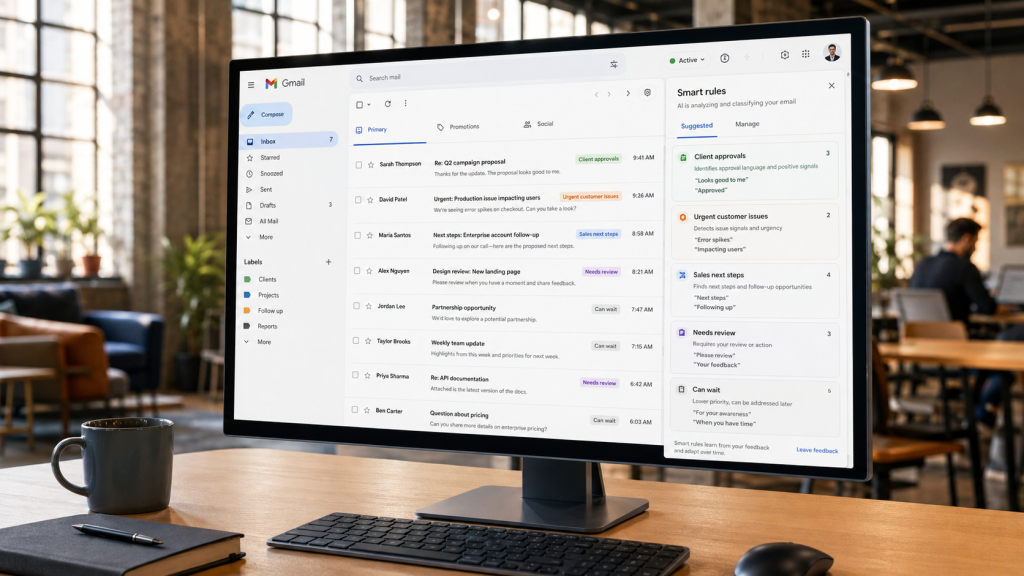
For many professionals, checking email has become a default work behavior.
Finish a task. Check Gmail. Join a meeting. Check Gmail. Wait for a file to load. Check Gmail again.
The habit feels responsible because important customer questions, client approvals, sales conversations, and internal requests may arrive at any time. But repeatedly opening the inbox is not the same as staying informed.
It often means asking the same question dozens of times a day: Did anything important happen since I last looked?
That is an inefficient way to manage attention.
A better email experience should help important activity come forward when it deserves review instead of requiring people to continuously search for it themselves. That is the practical promise behind smarter AI email notifications: improve awareness without turning the inbox into another source of constant interruption.
Surgy is being developed around that idea. Users continue working with Gmail while AI helps review supported activity, surface information that may need attention, and keep important decisions under human control.
Checking the Inbox Feels Productive Because It Reduces Uncertainty
People rarely open Gmail for no reason.
They check because email contains uncertainty.
Did the client approve the project? Did the prospect answer the proposal? Did the customer send the missing information? Did the vendor confirm the date? Did someone respond to an urgent internal request?
Opening the inbox provides a quick answer.
Usually, nothing important has changed.
That should make the habit disappear, but the opposite often happens. Because important messages can arrive unpredictably, users learn to check again later.
This turns email into a monitoring task.
The inbox becomes something that must be inspected rather than a communication tool that can be reviewed intentionally.
For people whose work depends on customers, projects, sales, vendors, or leadership communication, ignoring email for an entire day may not be realistic. The answer is not simply to tell people to check less.
The better question is whether software can reduce the amount of checking required to maintain useful awareness.
That means separating two activities that traditional inbox habits often combine:
Staying informed and opening the inbox.
If important information can be surfaced with enough context, users do not need to personally scan every new message just to determine whether something matters.
Repeated Inbox Checking Fragments Focus
A quick inbox check may take only a moment, but the interruption is larger than the time spent reading the screen.
Focused work has context. Writing a proposal, analyzing data, or solving a client problem requires holding information in mind.
Opening email introduces a different set of decisions: which messages are new, which matter, and whether anything requires a response.
Even when nothing requires action, attention has shifted away from the original task.
The issue becomes more noticeable when email checking is mixed with other systems. A message may lead to a CRM. A customer question may require checking a project platform. A payment question may send someone to accounting software. An internal request may create another task.
Surgy’s broader integration model is designed around bringing information from connected systems into a more unified AI operating layer. The practical benefit is not merely having more data in one place. It is reducing the amount of manual searching and switching required to understand what needs attention.
Email productivity therefore is not just about replying faster.
It is also about protecting attention from unnecessary review.
Traditional Notifications Do Not Solve the Attention Problem
The obvious alternative to constant inbox checking is notifications.
But most professionals already know the problem with that approach.
If every new message creates an alert, the user is still being interrupted by email. The only difference is that the inbox now interrupts them automatically.
Traditional notifications are usually based on activity rather than meaning.
A newsletter can create the same visible alert as an important customer message. An automated receipt can appear beside a project decision. A routine update can interrupt focused work even when no action is required.
Some users leave alerts enabled and accept frequent interruptions. Others disable them and return to manual checking. Many create filters and priority settings to find a workable middle ground.
The real problem is not the absence of alerts.
It is the absence of useful prioritization.
A better notification system should help answer questions such as:
- Does this activity appear to require attention?
- Is there a request, decision, or time-sensitive issue?
- Is this related to an important active conversation?
- Can this information wait until the user’s next planned email review?
The objective is not to make AI decide the importance of every message perfectly.
It is to give users a better signal than “something arrived.”
A Better Email Routine Starts With Intentional Review
The alternative to living inside the inbox is not abandoning it.
Email still needs dedicated attention. Messages need to be read. Decisions need to be made. Responses need human judgment.
The practical change is moving from continuous checking toward intentional review supported by better signals.
A user might spend focused time working on a proposal while important email activity is monitored in the background. Instead of reopening Gmail every few minutes, the user can rely on selected activity being surfaced for review when appropriate.
Then, at planned points during the day, the inbox can be reviewed more deliberately.
This creates two layers of email attention:
Proactive awareness for activity that may deserve attention sooner.
Scheduled review for routine email processing.
AI can support the first layer without replacing the second.
That distinction matters because most email does not require immediate action. The goal is not to create an AI system that interrupts users more aggressively. It is to reduce the fear that something important will be missed if Gmail is not constantly open.
Surgy’s approval-first model fits that workflow. AI can help identify relevant activity or prepare possible next steps, while the user remains responsible for deciding what actually happens.
AI Can Surface Context, Not Just Messages
A useful alert should reduce work rather than create another task.
If a notification only says “new email from Alex,” the user may still need to open Gmail, find the thread, reread the conversation, and determine why the message matters.
Context changes the experience.
An AI-assisted system can help evaluate supported conversation information and surface why an email may deserve attention. A request may relate to a client approval. A reply may change a project decision. A customer message may contain a time-sensitive question.
This is where Surgy AI Email differs conceptually from another standalone inbox.
Surgy is being developed as an intelligence layer around Gmail. Depending on available Early Access capabilities, it may help users review relevant activity, consider conversation context, and evaluate recommended next steps without asking them to replace the email tool they already use.
That creates a more practical role for AI.
The system does not need to answer every message autonomously.
It needs to help reduce the amount of manual scanning required to understand what deserves human attention.
Better context also makes notifications more selective. If the user can quickly understand why something was surfaced, the alert becomes a decision aid instead of another reason to open the inbox without knowing what they are looking for.
What This Looks Like in Real Work
The value becomes clearer in ordinary business situations.
A Founder Preparing for a Meeting
The founder needs uninterrupted time but still cares about customer or partner messages. Smarter awareness can reduce the urge to reopen Gmail merely to check whether something important happened.
An Agency Manager Reviewing Client Work
Client approvals, questions, and feedback may arrive while the manager reviews campaigns. AI-assisted prioritization can help surface communication that may deserve attention while routine activity waits.
A Consultant Doing Focused Project Work
The consultant may manage several clients at once. Contextual awareness can make it easier to stay immersed in one project without treating an open inbox as the only way to remain informed.
A Sales Professional Preparing a Proposal
The salesperson needs focused time while active prospect conversations continue. Better signals can help distinguish potentially meaningful activity from routine inbox traffic.
None of these examples requires autonomous email.
They require a better relationship between attention and communication.
The Goal Is Better Awareness With Less Monitoring
Email should support work, not become the place where work waits to be discovered.
The traditional model puts much of the monitoring burden on the user. People repeatedly open the inbox, scan what changed, decide whether anything matters, and return to what they were doing.
AI creates an opportunity to reverse more of that process.
Supported activity can be reviewed in the background. Potentially important information can be surfaced with context. The user can decide what deserves attention and what can wait.
That is a more useful definition of email productivity than simply processing more messages.
It protects the ability to focus while maintaining awareness of communication that may affect customers, projects, sales, operations, or decisions.
Surgy’s Gmail-first approach is being developed around the idea that users should continue using the tools they already know while adding an intelligence layer around them. Available features may evolve during Early Access, but the direction is deliberately different from building another inbox people must constantly monitor.
The best AI email assistant should not give you another place to check.
It should help make checking less necessary.
Join Surgy Early Access to explore a Gmail-first approach to smarter email awareness and connected business workflows.
FAQ
Why do people check their inbox so often?
People frequently check email because important messages can arrive unpredictably. Opening the inbox reduces uncertainty about whether a customer, client, colleague, prospect, or vendor has sent something that requires attention.
Can AI reduce how often I need to check email?
AI can help surface supported email activity that may deserve attention, potentially reducing the need to manually scan the inbox solely to see whether something important has changed. Users still need to review email and decide what actions are appropriate.
Are AI email notifications the same as regular Gmail notifications?
No. Standard notifications generally indicate that new activity occurred. AI-assisted notifications can potentially use supported context to help determine why certain email activity may deserve attention.
Does Surgy replace Gmail?
No. Surgy AI Email is being developed to work alongside Gmail rather than replace it. Users continue using Gmail while Surgy provides an additional layer of AI-supported assistance and human-reviewed recommendations.