
AI Email Summaries
AI Email Summaries for Faster Gmail Conversation Review
Business email conversations rarely stay simple.
A client request can develop across several replies. A prospect may return to a discussion days later. A project thread can contain questions, decisions, corrections, attachments, and commitments spread throughout multiple messages.
When that happens, understanding an email often requires more than reading the latest reply. Users may need to scan earlier messages again just to remember what happened, what was agreed upon, and what still needs attention.
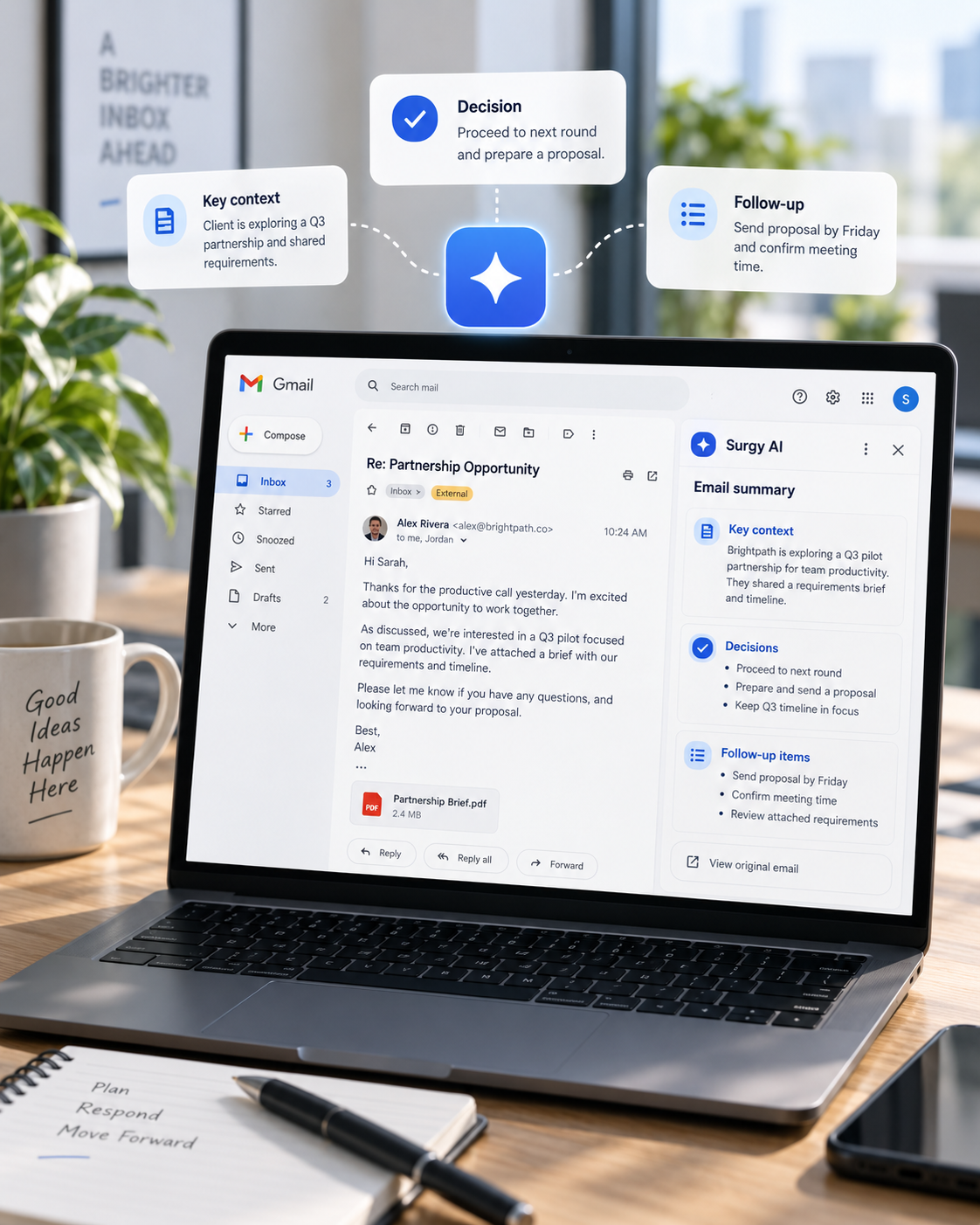
AI email summaries condense long email conversations into key context, questions, decisions, and possible follow-up items for review. They can give users a faster starting point before they return to the original messages for details that require confirmation.
Surgy is developing a Gmail-first AI Email Assistant around conversation understanding, context review, and human-approved next steps. Email-summary capabilities may vary during early access as the product continues to be developed and tested.

What Are AI Email Summaries?
AI email summaries are condensed explanations of information contained within an email or conversation.
Instead of manually rereading every message in a long thread, an AI-supported summary may help a user identify the main subject, important questions, decisions, requests, or other details that deserve closer review.
The purpose is not simply to shorten an email. A useful summary should make the conversation easier to understand while preserving enough context for the user to decide what to review next.
For example, a lengthy discussion may include:
- The original reason for the conversation
- Questions raised by one or more participants
- Information already provided
- Decisions that have been discussed
- Requests that may still need attention
- Commitments mentioned earlier in the thread
- Details that could affect a future response
Where supported, AI can help organize this information into a more concise view. The user can then return to the original conversation whenever additional detail or verification is needed.
Why Long Email Threads Become Difficult to Review
Email conversations accumulate context over time.
A thread that begins with a simple question may later contain revisions, clarification requests, new participants, additional requirements, or changes to an earlier decision.
The latest message may make sense only when earlier parts of the conversation are considered.
This becomes especially challenging for professionals who manage multiple active relationships at once. A consultant may have several client discussions underway. An account manager may need to remember what was promised in an earlier exchange. An executive may return to a conversation after several days of unrelated work.
The problem is not necessarily finding the email. It is rebuilding an understanding of the conversation.
A concise overview can help users get oriented before reviewing the details themselves.
This is different from an AI Inbox, which is intended to help users recognize conversations that may require attention. Email summaries focus more specifically on understanding the contents and history of a conversation once it is being reviewed.

What Should an AI Email Summary Include?
A useful email summary should make the most important parts of a conversation easier to identify without creating the impression that the summary replaces the source messages. The exact information that matters depends on the thread, but several elements are commonly useful.
Conversation Purpose
The summary should make clear why the conversation exists. That could be a customer request, a sales discussion, a project update, an approval request, or another business purpose. Understanding the original purpose helps users interpret later replies in the correct context.
Decisions and Commitments
If a participant agreed to provide information, approved a change, or committed to a next step, that context can affect how the conversation should be handled. These details can also help distinguish between an issue that is still under discussion and one that has already been resolved.
Dates and Timing
Dates, deadlines, meeting times, delivery expectations, and other timing details may influence the next response. These details should still be checked against the original messages when accuracy matters.
Important Participants
When multiple people are involved, it may be useful to understand who contributed key information, made a request, or provided an approval. This becomes particularly relevant when someone joins a conversation after it has already developed across several messages.
Questions and Requests
Open questions can easily become buried in long threads. A useful summary should help surface questions or requests that may still need attention instead of treating every message as equally important.
Unresolved Items
A summary becomes more useful when it helps distinguish between what has already been addressed and what may still be open. Unresolved questions, pending approvals, or incomplete requests can otherwise disappear inside lengthy conversations.
Information Requiring Verification
Some information should never be accepted from a summary alone. Financial terms, contractual points, deadlines, sensitive instructions, or other consequential details should be reviewed in the original email conversation before the user acts on them. These elements make summaries more useful for understanding and decision-making without turning them into substitutes for the underlying messages.
Understand the Conversation Before Deciding What Comes Next
A summary becomes more useful when it helps answer practical questions about an email thread.
What started the discussion?
What information has already been exchanged?
Did someone ask a question?
Was a decision discussed?
Is there something the user should verify before replying?
These questions matter because professional email often affects customer expectations, deadlines, approvals, projects, and business relationships.
Surgy’s broader email approach is built around helping users review communication rather than handing important decisions entirely to AI.
Where supported during early access, summarized conversation information may help users become familiar with a thread before deciding whether they need to read particular messages more closely.
That approach also helps separate summarization from other email tasks.
Search helps users locate relevant messages. Inbox prioritization helps identify which conversations may deserve attention. Summaries focus on making the content of a selected conversation easier to understand.
An AI email summary therefore works best as part of a broader review process rather than as a replacement for the inbox, search, or the original conversation.
Where Email Summaries Can Be Useful
Different types of business conversations can benefit from faster context review.
Client and Customer Conversations
Long-running client discussions may include requests, revisions, approvals, and previous commitments. A summary can help a professional quickly recall why the conversation began, what has already been discussed, and which parts of the thread deserve closer review before responding.
Sales and Prospect Discussions
A prospect conversation may develop over several exchanges involving questions, requirements, objections, timing, and possible next steps. Reviewing the broader context can help users understand where the conversation currently stands and whether the latest message changes anything previously discussed.
Project Communication
Project threads can become difficult to follow when multiple people contribute updates or when plans change over time. A concise overview may make it easier to identify important developments, unresolved questions, and prior decisions before reviewing individual messages in detail.
Internal Requests and Decisions
Internal email can contain approval requests, questions, decisions, or information that needs additional review. Summaries can provide a starting point for understanding what has been requested, who is involved, and whether a decision or response may still be needed. The value in each case comes from reducing the amount of context a person must reconstruct manually while still allowing them to inspect the source conversation.
Keep Human Review at the Center
Summarization does not eliminate the need for judgment.
AI can misunderstand context, overlook nuance, or give too much importance to one part of a conversation. Sensitive communication may also depend on information that is not fully expressed inside an email thread.
For that reason, Surgy follows an approval-first approach across its AI email experience.
A summary may help a user understand a conversation, but the user remains responsible for reviewing important details and deciding what happens afterward.
The same principle applies when Surgy provides other forms of Gmail AI assistance. AI can support the review process while the person remains responsible for evaluating the information and determining the appropriate response.
This distinction is especially important when an email involves:
- Financial commitments
- Customer expectations
- Deadlines
- Contractual or policy matters
- Sensitive professional communication
- Changes to an established agreement
- Information that requires verification
AI assistance should make review easier. It should not encourage users to stop checking information that matters.

Make Important Email Context Easier to Review
A busy inbox creates more than a volume problem. It creates a context problem.
Every time users return to an older conversation, they may need to remember what happened, which questions were answered, and why the latest message matters.
AI email summaries can provide a more efficient starting point by condensing conversation information into a form that is easier to review.
Surgy is being developed as a Gmail-first AI assistant that adds intelligence around existing email workflows rather than requiring users to replace Gmail.
Its purpose is to help professionals understand communication, review useful context, and consider what may deserve attention next while keeping important decisions under human control.
Surgy remains in early access, and individual email features and supported workflows may continue to change as development progresses.
FAQ
What are AI email summaries?
AI email summaries are condensed overviews of information contained in an email or conversation. They can help users understand the main subject, important details, questions, decisions, or other relevant context without beginning every review by rereading an entire thread.
Are email-summary capabilities available in Surgy Early Access?
Surgy is being developed as a Gmail-first AI email assistant. Email-summary capabilities and supported workflows may vary during early access, so users should rely on current Surgy product information when evaluating availability.
Do AI email summaries replace reading the original email?
No. An AI-generated summary can make a conversation easier to review, but users should return to the original messages when accuracy, nuance, commitments, deadlines, or other important details need to be verified.
How are email summaries different from an AI Inbox?
Email summaries focus on helping users understand the contents and context of a conversation. An AI Inbox focuses more broadly on helping users recognize conversations that may require attention and consider where attention may be needed next.
Does Surgy automatically act on information in an email summary?
No. Surgy follows an approval-first approach. AI-supported information and recommendations are intended for human review, and users remain responsible for deciding what actions or responses are appropriate.
Understand Long Email Conversations Faster
AI email summaries can help surface key context, questions, decisions, requests, and possible follow-up items from longer Gmail conversations. Review the summary first, then return to the original messages whenever important details need to be confirmed.